
Documentation
This is a basic overview on how BrownieGate works.
Production security note: avoid embedding long-lived or server-side secrets (encryption keys, database credentials, or persistent API keys) in client-side code.
How it works — Quick explanation
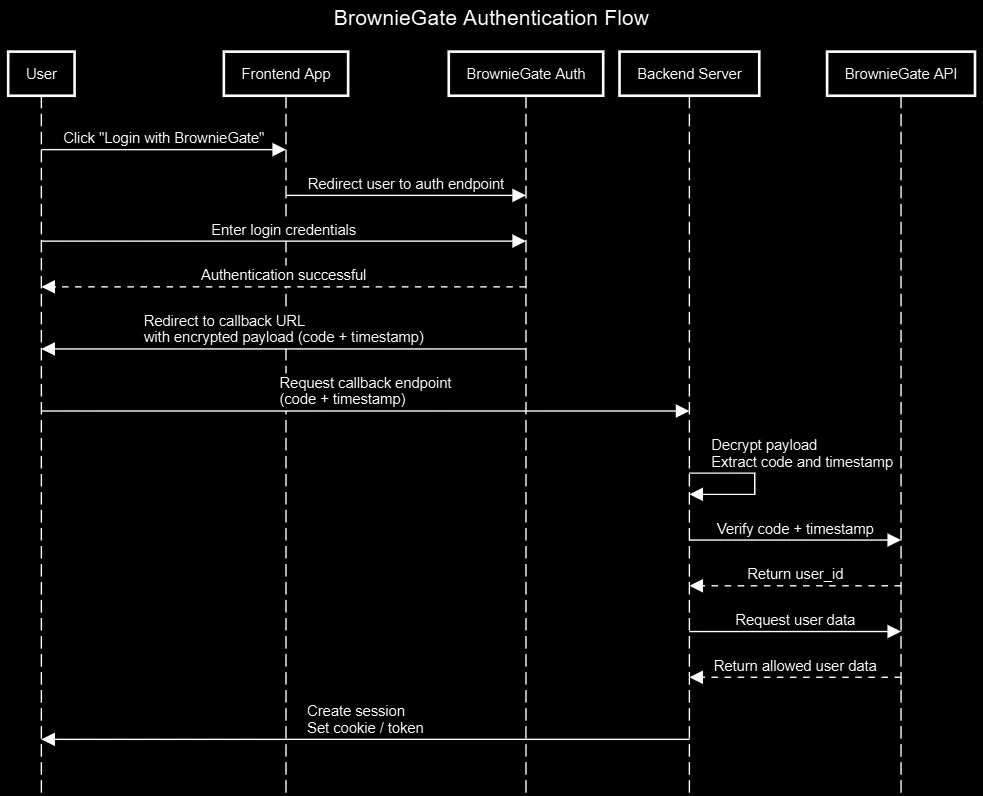
BrownieGate acts as an authentication server and SSO provider. Typical flow:
-
The user clicks "Login with BrownieGate" in your app; the app opens the BrownieGate auth endpoint (usually in a new window/tab) and includes the project's UUID in the request headers (
project-uuid). -
The user authenticates on BrownieGate. On success BrownieGate creates a one-time code and a timestamp, stores them server-side, then redirects the browser back to your project's configured callback URL with an encrypted payload, e.g.
{"code": "<one_time_code>", "timestamp": "time.now()"}(encrypted with the project's encryption key provided at setup). -
Your project's callback endpoint receives the redirect and encrypted payload. Your server decrypts the payload using the project's encryption key and extracts the
codeandtimestamp. -
Your server calls BrownieGate's verification endpoint (server-to-server), sending the
codewith the headers:project-uuidandauthorization(your API key). BrownieGate checks the code exists and that the timestamp is fresh (not older than 1 minute); valid codes are single-use and removed after verification. -
If verification succeeds, BrownieGate returns success and the associated
user_id. Your server can then call/api/user/get_dataor/api/user/get_pfp(withproject-uuid,authorizationanduser_id) to retrieve the user fields (projects are only allowed to get user data that the user has consented to). -
Your site establishes a session for the user (create a short-lived server session token or set a secure HttpOnly cookie, or use
/api/cookie/generate), and continues with normal authenticated flows. Keep the API key and the project encryption key on the server only.
 Files & repos to check
- BrownieGate Python package — helper client for server-side integration.
- Usage example repo — complete sample app using BrownieGate.
- Flask login example repo — Small login example using flask-login.